Team Chat
Built-in messaging that keeps conversations connected to the work. Create channels, message privately, and bring jobs, assets, and requests right into the conversation.
Built by industry veterans and active field service operators.
Problems Wrangler.ai Helps Solve
Team Chat
Mention a work order, service request, vehicle, or asset right in the conversation, so your team knows exactly what the conversation is about.
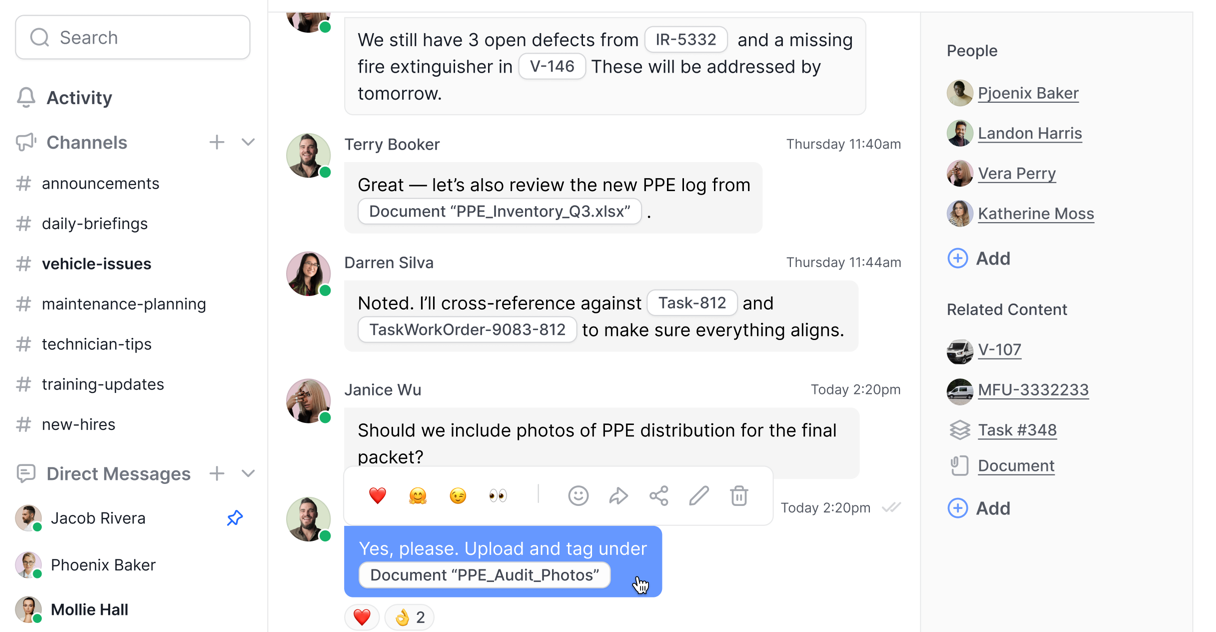
Bring work orders, service requests, vehicles, equipment, and more directly into the conversation with @mentions.
Create company-wide channels, crew and department groups, or private conversations when the message is just for one person.
Give your team one place for work conversations, photos, files, and updates without relying on scattered group texts.
Group texts live on personal phones, leave when an employee does, and can’t be searched. Team Chat keeps work conversations in one place the company owns.
Pull a work order, service request, vehicle, or asset right into the message. Everyone sees exactly what the conversation is about, with the work a tap away.
Yes. Company-wide channels, groups for crews or departments, and private messages when it’s just for one person.
Yes. Photos, files, and updates go straight into the conversation, where they stay searchable instead of buried in a text thread.
Everyone. Desktop for the office, mobile for the field, one conversation in between.
Free onboarding and data migration included.
